Free Starlink Mini With Your Residential Plan? 7 Things to Know Before You Take It Off-Grid
Starlink now hands a free Starlink Mini rental to every Residential customer in the US. Here is how the offer really works, what it costs to use away from home, and the one thing the box does not include.
The free Starlink Mini ships with a wall power supply, so it only works near an outlet. Our clip-on 99Wh Battery Lite and 158Wh Ravion Battery are what make it portable.
On September 22, 2026, Starlink expanded its free Starlink Mini rental from Residential Max only to every Residential plan in the US. The dish is a no-cost rental, not a gift. You keep it free by putting it on Standby Mode or a discounted Roam plan, and you must return it within 30 days if you cancel your Residential service.
- Cost: $0 for the hardware; a $199 Starlink Mini to buy outright.
- To use it away from home: add Standby Mode or a Roam plan (20% off, or half price on Residential Max).
- What is missing: portable power. It runs from a wall outlet until you add a battery or a 12–24V adapter.
What changed on September 22 with the free Starlink Mini offer
Until last week, only Residential Max subscribers could claim a free Starlink Mini. On September 22, 2026, Starlink opened the offer to any active Residential plan, including the standard 100 Mbps tier, according to reporting from Tesla North and Notebookcheck.
Ravion® · Built only for Starlink Mini · New Mini owner? Start here
Run your Mini up to 9 hours, no outlet.
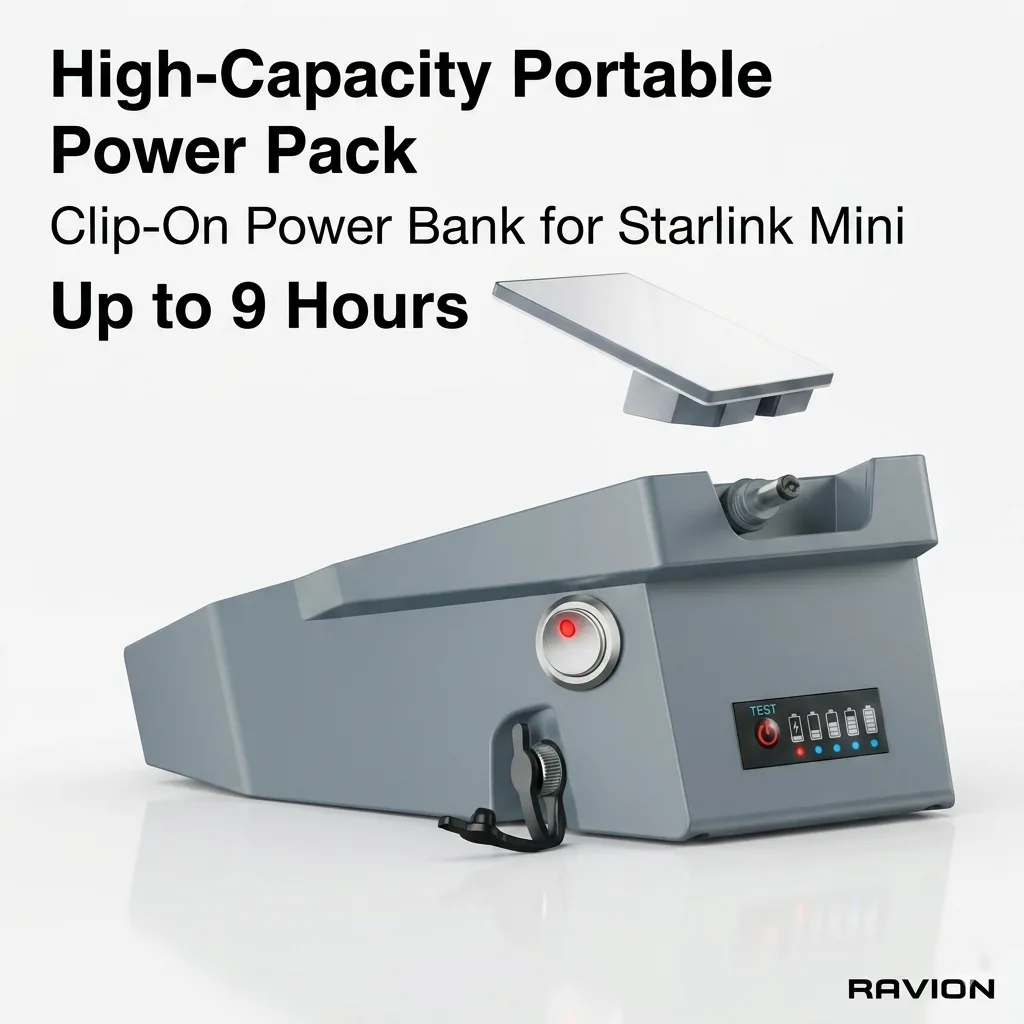
Ravion® Battery
158Wh · up to 9 h runtime · IP65 · 2.6 lbs · Carry-on w/ airline approval
$329 Shop now →
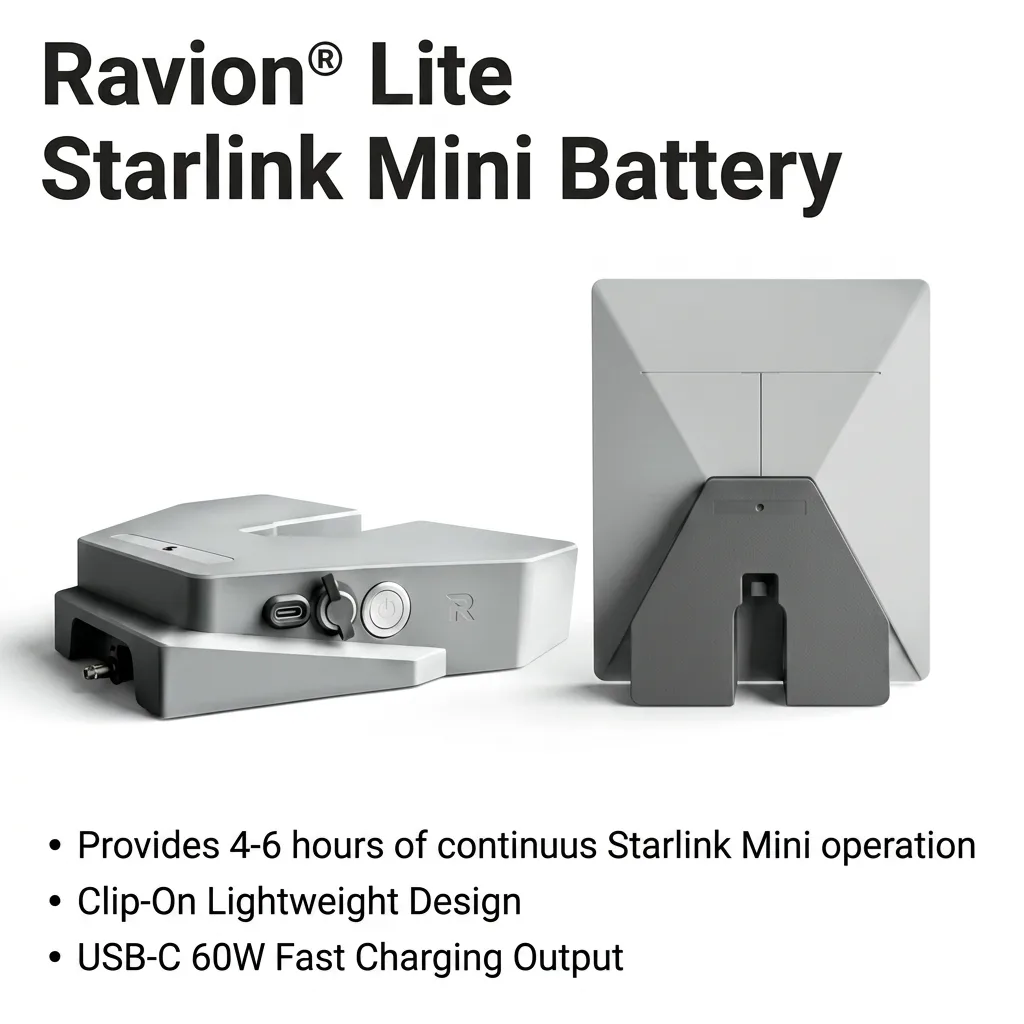
Ravion® Battery Lite
99Wh · up to 6 h runtime · 1.9 lbs · USB-C 60W out
$189 Shop now →
Free U.S. shipping on orders $100+ (West Coast) / $200+ (other states) · 30-day returns · 12-month warranty · Ships from California in 1 business day · See all power kits
That is a big deal for road-trippers, boaters and anyone who wants backup internet. Millions of households already pay for Residential service, and now each of them can add a portable dish without spending $199 on hardware.

How the free Starlink Mini rental works
- It arrives by invitation. Eligible customers get an email with a "Claim Mini" button and a short survey. There is one kit per customer.
- It is a rental. You never own the dish, and units may be refurbished.
- You keep it free with Standby Mode or Roam. Standby keeps the Mini connected for basic messaging for a small monthly fee. A Roam plan unlocks full-speed use away from home.
- It is tied to your Residential plan. If you cancel Residential or change your primary plan type, you have 30 days to return the Mini or pay for it.
Published Roam discounts vary between reports. Starlink describes the perk as half price for Residential Max and 20% off for other Residential plans. Confirm the exact monthly price in the Starlink app before you activate Roam.
Free Starlink Mini vs buying one
| Question | Free Starlink Mini (rental) | Buy a Starlink Mini ($199) |
|---|---|---|
| Upfront cost | $0 | $199, or $16/mo for 12 months |
| Who owns it | Starlink | You |
| Needs an active Residential plan | Yes | No |
| If you cancel Residential | Return within 30 days | Keep it on Roam |
| Condition | May be refurbished | New |
| Works off-grid out of the box | No, needs outside power | No, needs outside power |
If you already pay for Residential and plan to keep it, the free Starlink Mini is the obvious choice. If you are moving, switching providers or might cancel within a year, buying your own Mini avoids a forced return.
What the free Starlink Mini really costs per year
The hardware is free, but the service line is not. Here is what the Roam discount works out to at current US list prices (before taxes). Starlink sets the final price per invitation, so confirm yours in the app.
| Roam plan | List price | Residential Max (50% off) | Other Residential (20% off) |
|---|---|---|---|
| Roam 100GB | $55/mo | about $27.50/mo | about $44/mo |
| Roam 300GB | $80/mo | about $40/mo | about $64/mo |
| Roam Unlimited | $175/mo | about $87.50/mo | about $140/mo |
Two common travelers, with Standby Mode at $10/mo in the months the Mini stays home:
- Summer camper on a standard Residential plan: 4 months of Roam 100GB at about $44 plus 8 months of Standby comes to about $256 a year with the rental. Buying the same setup costs $499 in year one ($199 + 4 × $55 + 8 × $10), then about $300 a year.
- Remote worker on Residential Max who travels all year: 12 months of Roam 300GB at about $40 is about $480 a year with the rental, versus $1,159 in year one if you buy ($199 + 12 × $80) and $960 a year after that.
Because the Roam discount applies every month, the rental stays cheaper than buying for as long as you keep home service. Buying still wins if you have no Residential plan (many full-time RVers), you were not invited, or you want to own and resell the hardware. Our Starlink Roam plans guide explains what each tier allows, and our Starlink Mini cost breakdown has more first-year budgets.
The one thing a free Starlink Mini does not include: portable power
The Starlink Mini has no battery of its own. It ships with a wall power supply, so the moment you leave an outlet behind it needs 100W USB-C Power Delivery, a 12–24V vehicle feed or a purpose-built battery. A 45W phone charger will usually reboot it during the first upload burst.
Here is how long a clip-on battery runs a Starlink Mini, using the same method across all our guides (rated Wh × 0.85 for conversion losses ÷ average watts):
| Battery | Light use (~15–20W) | Steady 30W (calls, streaming) | Flies carry-on |
|---|---|---|---|
| Ravion® Battery Lite, 99Wh | 4–6 h (rated) | about 2.8 h | Yes, no approval |
| Ravion® Battery, 158Wh | 6–9 h (rated) | about 4.5 h | With airline approval |
Want the full breakdown? Read how long the Starlink Mini runs on battery.


7 things to do before your first trip with a free Starlink Mini
- Pick Standby or Roam. Standby is enough for messages and emergencies. Choose Roam 100GB for weekend trips, and Roam Unlimited only if you travel internationally or work remotely every day.
- Test it at home first. Set it up in the yard, let it update firmware and run the obstruction check in the Starlink app before you are miles from help.
- Solve power. Pick a 99Wh clip-on battery if you fly or hike, a 158Wh pack for full days, or a 12–24V adapter if it rides in a vehicle.
- Mount it where the sky is open. The kickstand is fine on a table. For roofs, glass and campsites, use a magnetic, suction or tripod mount.
- Protect it, because it goes back. A rental you have to return in good condition deserves a hard case. Our travel case keeps the battery, cables and small parts together.
- Plan your data. HD video calls use roughly 1–2 GB an hour, so a 100GB Roam plan covers a lot of weekends but not daily remote work.
- Know the return rule. If you change or cancel Residential, set a reminder: you have 30 days to send the free Starlink Mini back.
Is the free Starlink Mini worth it?
For most Residential customers, yes. A $199 dish for $0 is a genuinely good deal, and Standby Mode makes it a cheap emergency backup even if you rarely travel. The honest catch is that the rental is tied to your home plan, and it is useless off-grid until you add power. Budget for a battery or a vehicle adapter on day one, not after your first dead-dish campsite.
New to the Mini? Our new owner guide: the 5 accessories you actually need walks through the full kit, and our Starlink Mini 2 tracker covers the built-in-battery model that has not launched yet.
Free Starlink Mini FAQ
Is the Starlink Mini really free for Residential customers?
Yes, as a rental. Since September 22, 2026, any active US Residential plan can claim one free Starlink Mini by invitation. You do not own it, and you must keep your Residential plan active.
Do I need a Roam plan to use the free Starlink Mini?
You need Standby Mode or a Roam plan to use it away from home. Residential customers get a Roam discount: half price on Residential Max and 20% off on other Residential plans.
What happens to my free Starlink Mini if I cancel Residential?
You have 30 days to return it. If you do not, Starlink charges you for the hardware.
Does the free Starlink Mini come with a battery?
No. The Starlink Mini has no built-in battery and ships with a wall power supply. To use it off-grid you need 100W USB-C PD, a 12–24V vehicle adapter or a clip-on battery such as the 99Wh Battery Lite or 158Wh Ravion Battery.
How long will a battery run a free Starlink Mini?
A 99Wh battery is rated 4–6 hours in light use, or about 2.8 hours at a steady 30W. A 158Wh battery is rated 6–9 hours in light use, or about 4.5 hours at 30W.
Is the free Starlink Mini cheaper than buying one?
Yes, as long as you keep Residential service. A summer camper on a standard Residential plan pays about $256 a year with the rental versus $499 in year one if they buy, because the Roam discount (20% off, or 50% on Residential Max) applies every month.
Get 15% off your first Starlink Mini power kit (up to $30)
Runtime tests, mount tips and new-gear alerts from our California workshop — one email a week, no spam. Your WELCOME15 code (15% off, up to $30) lands in your inbox right away.
Got a free Starlink Mini? Make it portable today.
Ravion® clip-on batteries ship in 1 business day, with 30-day returns and a 12-month warranty.